Bake’s Small Airport Projects - 1:400

It’s been a while!

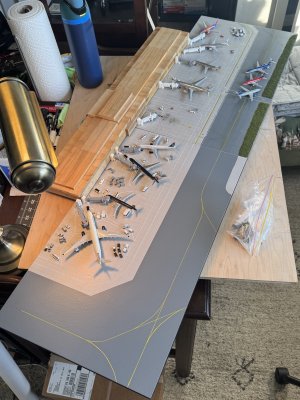
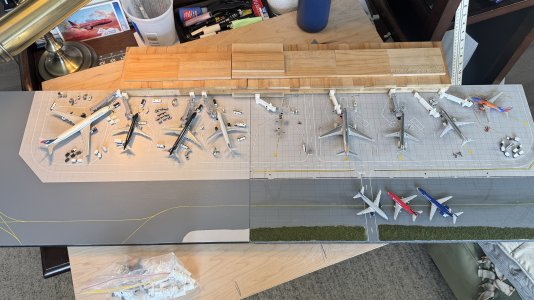
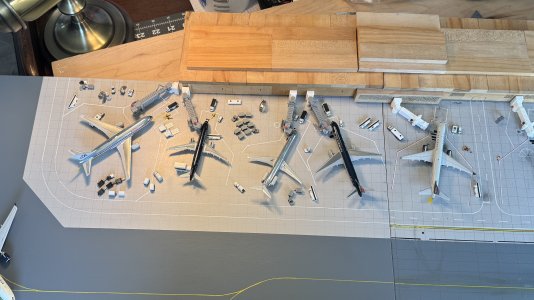
While these photos aren’t new by any means, I wanted to show off a super old airport board I made back in 2018! It used the GJ terminal with my own hand painted ground markings. It uses similar materials to what I use now, just a bit simpler in terms of detail (no clear coat, now weathering, etc). I’m unsure how I managed to get all my ground markings so perfect and even (albeit not 100% realistic like I do now) but i’m impressed with my work from 7 or so years ago! Unfortunately this has since been painted over now but it’s a good way to see how far i’ve already come!


These first few photos were from an earlier version, the hardstands were different and the gate area didn’t have concrete lines or anything. It featured 7 gates, 1 true widebody and 1 up to a 767, the rest were all up to a 757. Hardstands could fit 3 narrowbody or a range or E170 sized with up to a 767 beside them.
View attachment 58485
View attachment 58488
View attachment 58489

This seems to be version 2, now with more concrete lines, gate marking changes, and new hard stand layout with a small commuter terminal. You’ll notice I added another gate using that double jet bridge that comes with the terminal, plus the regional area becomes a true regional area only for 3 E170 sized aircraft. The gate markings reflect AAs current gate markings, I assume I was emulating what was happening at PHL around the time of the merger.
View attachment 58490
View attachment 58491
View attachment 58492
View attachment 58495
View attachment 58498

More to come soon! I’ve been in a rut and life has been life-ing recently. I need to finish PHL and start some more fun projects here soon!

This is an amazing use of the GJ terminal! I have this lying around with some models...what size board did you use for this?
 
This is an amazing use of the GJ terminal! I have this lying around with some models...what size board did you use for this?

Basically 2ftx4ft. I got a full sized 8x4 MDF board from a local hardware store and got it cut up into 4 equal parts I believe. The terminal and landslide ramp were tight against the end of the board as shown. Works out to a good amount of space if you’re smart!
 
Basically 2ftx4ft. I got a full sized 8x4 MDF board from a local hardware store and got it cut up into 4 equal parts I believe. The terminal and landslide ramp were tight against the end of the board as shown. Works out to a good amount of space if you’re smart!
Awesome! Look out for me hopefully making a new airport soon!
 
Beginning to layout an extension to my fictional layout. This extension will add 3 standard gates and 5 hardstands for regionals. The middle standard gate will reach up to a 767-300 and the rest are all up to a 757 or A321/737 size. This brings the terminal up to a total of 5 regional gates (up to about a CRJ200/E145), 3 gates up to an A321/737, 3 more gates up to a 757, and one gate for up to a 767. Plus 3 additional Southwest stylized gates. Total of gates A1-A11 as i’m calling it, with A11 having an A11a-A11e for the regional gates.

This extension will nearly complete the airside of this terminal (Terminal A as I am officially calling it!) as all that will be left is one or two additional “southwest stylized” gates on the left hand side (A1/A2 as i’m calling them eventually).

Those two last gates will be on the next extension which will be two more similar sized boards below of this picture featuring mostly a very detailed land side of the terminal. I’m choosing to do this so I have flexibility over only setting up one board, all four, or any combination. The terminal will cover up most of the seams as only 3/4” of the building sits on these boards as you can also see in the photo.

View attachment 52862

The small white building in the middle will be a bump out on an eventual terminal building to add more interest to it. It has yet to be fully designed but I hope to grab inspiration from a handful of 2000s/2010s terminals around the US.

View attachment 52863

A photo “Down the alley” showing what they can look like when eventually finished:

View attachment 52864

I have no clue when i’ll get around to this (probably after PHL is finished) but I don’t think I’ll stray too far from this layout. I have a Terminal B sketched out eventually too but that’s wayyyyy later down the line for me😅

I decided to give this extension a go the last few days. Here is the progress so far. Some things on the layout have changed but I like the new version more. I’ve added a widebody stand at the top which means bigger taxiways for the larger planes, hence the taxiway shift on the new board. Also added some diagonal taxiways for some visual interest.

I still haven’t fully decided but I may add some regional stands. I have them mapped out where they go, just not on the board yet. Lots to do but it’s getting there pretty quickly.

IMG_6144.jpegIMG_6146.jpeg
 
I decided to give this extension a go the last few days. Here is the progress so far. Some things on the layout have changed but I like the new version more. I’ve added a widebody stand at the top which means bigger taxiways for the larger planes, hence the taxiway shift on the new board. Also added some diagonal taxiways for some visual interest.

I still haven’t fully decided but I may add some regional stands. I have them mapped out where they go, just not on the board yet. Lots to do but it’s getting there pretty quickly.

View attachment 64313View attachment 64312
Will you outline the white in red? Looking good!
 
I decided to give this extension a go the last few days. Here is the progress so far. Some things on the layout have changed but I like the new version more. I’ve added a widebody stand at the top which means bigger taxiways for the larger planes, hence the taxiway shift on the new board. Also added some diagonal taxiways for some visual interest.

I still haven’t fully decided but I may add some regional stands. I have them mapped out where they go, just not on the board yet. Lots to do but it’s getting there pretty quickly.

View attachment 64313View attachment 64312
what are the dimensions of those boards?
 
each board is 13.75in x 24in. It’s a bit of an odd size but I got these as scrap from work. I plan to keep these rough dimensions for all expansion boards on top of this
I get mine as scrap as well, but mine are a bit larger around 23x46 or something like that if I remember correctly. I'm considering doing something on a smaller board like yours!
 
Today, the GF works at the hospital and i’m home alone. That means a full day of airport progress in the works!

When creating a fictional airport, it’s important to know what planes work at what stands, especially if they’re all different shapes and sizes like mine. I’ve been getting random models out and placing them around with GSE to figure out the rest of my ground markings and what planes work where and where they get too constrained. Let me show some examples!

Here is an overview of what both boards look like together so far, with a temporary wooden terminal (will be a custom 3D printed one eventually).

IMG_6160.jpeg

For now, let’s pretend these are gates A1-A9 from A1 being far left and progressing in order to the southwest 737 at A9.

A1 can handle any plane type very well. I’ll have to check 773s and A346s, but this kind of airport wouldn’t handle those types of aircraft realistically anyways. A333s fit like a glove as shown.

A2 can handle anything up to a 739 or A321. No 757s as it gets a bit too tight.

A3 is a bit odd looking, but is the only gate other than A1 to handle 753s. It can handle anything up to that plane type. Shown is a 752 which gets tight but realistic for early 2000s parking.

A4 can handle up to A321s and 752s (no winglets only, with winglets gets too tight). Shown here is an A321.

A5-A9 handle what they’ve always been able to. I plan to possible add 762s to park at A6 as shown. I planned to have 762s parking at A5 but with the new board it starts to get very tight, so i’ll accept defeat there. A6 is shown with the 762, the wingtips just barely go over the lines, a simple fix for me to make adjustments!

IMG_6162.jpeg

This photo shows other planes at certain gates.

A1 shows how a 762 looks, A3 shows an MD80, and A4/5 show 757s next to eachother. Remember how A4 only can handle 757s with no winglets but A5 handles ones with winglets just fine.

IMG_6163.jpeg

One thing i’m looking at while doing this on top of plane spacing, is GSE placement. In the real world, there needs to be space for gse to move around with fuel trucks, baggage carts and loaders, and many more. That movement will decide where paint markings for parking will be placed, which is my next task for designing! What i’ve done here is very broad and just playing with many realistic options as to how these things work in the real world (I am no expert however, just watched a few POV videos of ground handling in the past 🤣)
 
Today, the GF works at the hospital and i’m home alone. That means a full day of airport progress in the works!

When creating a fictional airport, it’s important to know what planes work at what stands, especially if they’re all different shapes and sizes like mine. I’ve been getting random models out and placing them around with GSE to figure out the rest of my ground markings and what planes work where and where they get too constrained. Let me show some examples!

Here is an overview of what both boards look like together so far, with a temporary wooden terminal (will be a custom 3D printed one eventually).

View attachment 64467

For now, let’s pretend these are gates A1-A9 from A1 being far left and progressing in order to the southwest 737 at A9.

A1 can handle any plane type very well. I’ll have to check 773s and A346s, but this kind of airport wouldn’t handle those types of aircraft realistically anyways. A333s fit like a glove as shown.

A2 can handle anything up to a 739 or A321. No 757s as it gets a bit too tight.

A3 is a bit odd looking, but is the only gate other than A1 to handle 753s. It can handle anything up to that plane type. Shown is a 752 which gets tight but realistic for early 2000s parking.

A4 can handle up to A321s and 752s (no winglets only, with winglets gets too tight). Shown here is an A321.

A5-A9 handle what they’ve always been able to. I plan to possible add 762s to park at A6 as shown. I planned to have 762s parking at A5 but with the new board it starts to get very tight, so i’ll accept defeat there. A6 is shown with the 762, the wingtips just barely go over the lines, a simple fix for me to make adjustments!

View attachment 64468

This photo shows other planes at certain gates.

A1 shows how a 762 looks, A3 shows an MD80, and A4/5 show 757s next to eachother. Remember how A4 only can handle 757s with no winglets but A5 handles ones with winglets just fine.

View attachment 64469

One thing i’m looking at while doing this on top of plane spacing, is GSE placement. In the real world, there needs to be space for gse to move around with fuel trucks, baggage carts and loaders, and many more. That movement will decide where paint markings for parking will be placed, which is my next task for designing! What i’ve done here is very broad and just playing with many realistic options as to how these things work in the real world (I am no expert however, just watched a few POV videos of ground handling in the past 🤣)
Working on my own new board on Christmas Day too! No models under my tree, but I have a trip to MTS on Saturday, and I don’t think I’ll be leaving empty handed!
 
Today, the GF works at the hospital and i’m home alone. That means a full day of airport progress in the works!

When creating a fictional airport, it’s important to know what planes work at what stands, especially if they’re all different shapes and sizes like mine. I’ve been getting random models out and placing them around with GSE to figure out the rest of my ground markings and what planes work where and where they get too constrained. Let me show some examples!

Here is an overview of what both boards look like together so far, with a temporary wooden terminal (will be a custom 3D printed one eventually).

View attachment 64467

For now, let’s pretend these are gates A1-A9 from A1 being far left and progressing in order to the southwest 737 at A9.

A1 can handle any plane type very well. I’ll have to check 773s and A346s, but this kind of airport wouldn’t handle those types of aircraft realistically anyways. A333s fit like a glove as shown.

A2 can handle anything up to a 739 or A321. No 757s as it gets a bit too tight.

A3 is a bit odd looking, but is the only gate other than A1 to handle 753s. It can handle anything up to that plane type. Shown is a 752 which gets tight but realistic for early 2000s parking.

A4 can handle up to A321s and 752s (no winglets only, with winglets gets too tight). Shown here is an A321.

A5-A9 handle what they’ve always been able to. I plan to possible add 762s to park at A6 as shown. I planned to have 762s parking at A5 but with the new board it starts to get very tight, so i’ll accept defeat there. A6 is shown with the 762, the wingtips just barely go over the lines, a simple fix for me to make adjustments!

View attachment 64468

This photo shows other planes at certain gates.

A1 shows how a 762 looks, A3 shows an MD80, and A4/5 show 757s next to eachother. Remember how A4 only can handle 757s with no winglets but A5 handles ones with winglets just fine.

View attachment 64469

One thing i’m looking at while doing this on top of plane spacing, is GSE placement. In the real world, there needs to be space for gse to move around with fuel trucks, baggage carts and loaders, and many more. That movement will decide where paint markings for parking will be placed, which is my next task for designing! What i’ve done here is very broad and just playing with many realistic options as to how these things work in the real world (I am no expert however, just watched a few POV videos of ground handling in the past 🤣)
Also, the difference weathering makes is amazing! Do you draw your concrete tiles before or after drawing markings?
 
Today, the GF works at the hospital and i’m home alone. That means a full day of airport progress in the works!

When creating a fictional airport, it’s important to know what planes work at what stands, especially if they’re all different shapes and sizes like mine. I’ve been getting random models out and placing them around with GSE to figure out the rest of my ground markings and what planes work where and where they get too constrained. Let me show some examples!

Here is an overview of what both boards look like together so far, with a temporary wooden terminal (will be a custom 3D printed one eventually).

View attachment 64467

For now, let’s pretend these are gates A1-A9 from A1 being far left and progressing in order to the southwest 737 at A9.

A1 can handle any plane type very well. I’ll have to check 773s and A346s, but this kind of airport wouldn’t handle those types of aircraft realistically anyways. A333s fit like a glove as shown.

A2 can handle anything up to a 739 or A321. No 757s as it gets a bit too tight.

A3 is a bit odd looking, but is the only gate other than A1 to handle 753s. It can handle anything up to that plane type. Shown is a 752 which gets tight but realistic for early 2000s parking.

A4 can handle up to A321s and 752s (no winglets only, with winglets gets too tight). Shown here is an A321.

A5-A9 handle what they’ve always been able to. I plan to possible add 762s to park at A6 as shown. I planned to have 762s parking at A5 but with the new board it starts to get very tight, so i’ll accept defeat there. A6 is shown with the 762, the wingtips just barely go over the lines, a simple fix for me to make adjustments!

View attachment 64468

This photo shows other planes at certain gates.

A1 shows how a 762 looks, A3 shows an MD80, and A4/5 show 757s next to eachother. Remember how A4 only can handle 757s with no winglets but A5 handles ones with winglets just fine.

View attachment 64469

One thing i’m looking at while doing this on top of plane spacing, is GSE placement. In the real world, there needs to be space for gse to move around with fuel trucks, baggage carts and loaders, and many more. That movement will decide where paint markings for parking will be placed, which is my next task for designing! What i’ve done here is very broad and just playing with many realistic options as to how these things work in the real world (I am no expert however, just watched a few POV videos of ground handling in the past 🤣)
Whoa, are those jetways custom? They look great!
 
Also, the difference weathering makes is amazing! Do you draw your concrete tiles before or after drawing markings?

Weathering makes all the difference for this sorta thing! It makes the scene feel that much more alive. If you can do it right it helps makes the realism pop!

I usually start with my concrete lines right after painting the board. Then comes stuff like taxiways and gate markings, whatever needs to be put down first that will influence the other. Once both boards are “done” I plan to go through and single out a specific few concrete squares and replace with different colored concrete to signify age and replacement.
 
Whoa, are those jetways custom? They look great!

The dark grey ones are from ClipperModels. They were designed to go with my Pittsburgh Airport layout. I use them between both that board and this one till I get new ones. I like the unique color compared to standard white though, I plan to pick a fun darker color like these to make this fictional layout unique.
 
Weathering makes all the difference for this sorta thing! It makes the scene feel that much more alive. If you can do it right it helps makes the realism pop!

I usually start with my concrete lines right after painting the board. Then comes stuff like taxiways and gate markings, whatever needs to be put down first that will influence the other. Once both boards are “done” I plan to go through and single out a specific few concrete squares and replace with different colored concrete to signify age and replacement.
I tend to do my tiles after marking, to make the appearance of the tiles being 3D and the markings not going over the cracks and edges.
 
Top