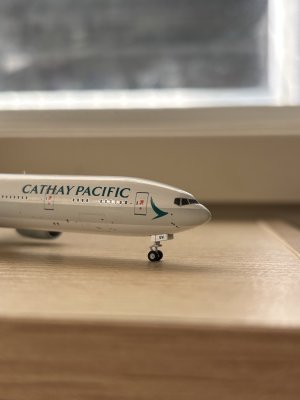
How do you get over imperfect models?

OlliesCove

Member
Hello everyone,

A bit of a general thread I thought I'd start regarding how we deal/accept models that are either damaged, imperfect or even if something 'feels off'.

I've got a relatively small collection due to my partner not liking clutter which means that I have to hunt down for the 'best' moulds and be extremely selective with what I buy. In saying that, pretty much all the models I've got are ones that I've flown on or just really really like the look of.

Unfortunately however, some models come inevitably damaged or are just scratched and for some reason, it's something that really bothers the heck out of me, so much so that I sometimes buy a second copy of a model that might only have a scratch on it. I'm not sure if this is because I spend way too much time looking at them up close and inevitably, they will all have something wrong with them. How do you all deal/accept with damage? What in your eyes is seen as a model in 'mint condition'?

Feel free to post photos below to show off scratches, smudges, damage etc.
 
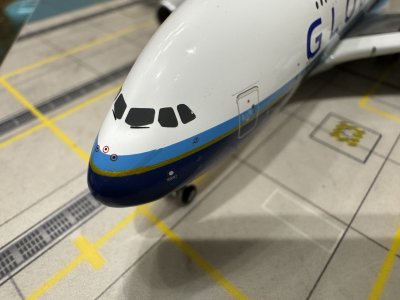
Here’s a Global Airlines A380 I bought from YY Wings’ official Taobao store back in January 2025. It had this minor scratch/printing imperfection by the cockpit windows. Everything else was perfect, which speaks for HX’s usual quality control. I initially tried to just accept the cockpit issue as is but my inner-perfectionist got the better of me so I messaged them and requested for a replacement. YY was kind enough to accept my request and I sent my defected model back to them and got my replacement model a few days later. The replacement was in perfect condition, no scratches, no scuffs, no printing issues, and the wings, engine nacelles, landings gears etc were all aligned and level. Top-notch customer service on YY’s part.

Though admittedly there are times when I receive models that come with imperfections that are much more significant than the tiny, almost unnoticeable one shown here. And whether or not I’d replace it, buy a second copy, or accept them for their defects, are determined on a case by case basis. There are times where I’d simply accept them for what they are. After all, diecast models are typically mass-produced and should not be regarded as perfect boutique items.

IMG_2263.jpeg
 
Last edited:
I would rather have a model in the best condition but that's not always an option. So it really depends on how big the issue is with the model. If the wing came detached and there is still a trace of glue after I fixed it, I can live with it. From memory, I only bought two models I had to get another because of QC issues, a Qatar 777 in the retro livery and an Air France A350 with the Paris 2024 olympics sticker. For the former, the front landing gear was broken and I couldn't fix it. My second example came in perfect condition. For the latter, it is a different story. I really wanted that model in perfect condition so despite managing to fix it, I still bought another one just so I could have one in perfect condition and I turned the first model into a custom model by removing the Paris 2024 sticker. But most of the times, I can live with imperfect models because most defects are not that visible and I have been able to fix the models. I mean they are there but I know it could have been far worse and getting a replacement isn't always the best option. You might get a model in a good condition or you might get really unlucky and receive another defective model. I'm sure quite a few people will disagree with me.
 
Here’s a Global Airlines A380 I bought from YY Wings’ official Taobao store back in January 2025. It had this minor scratch/printing imperfection by the cockpit windows. Everything else was perfect, which speaks for HX’s usual quality control. I initially tried to just accept the cockpit issue as is but my inner-perfectionist got the better of me so I messaged them and requested for a replacement. YY was kind enough to accept my request and I sent my defected model back to them and got my replacement model a few days later. The replacement was in perfect condition, no scratches, no scuffs, no printing issues, and the wings, engine nacelles, landings gears etc were all aligned and level. Top-notch customer service on YY’s part.

Though admittedly there are times when I receive models that come with imperfections that are much more significant than the tiny, almost unnoticeable one shown here. And whether or not I’d replace it, buy a second copy, or accept them for their defects, are determined on a case by case basis. There are times where I’d simply accept them for what they are. After all, diecast models are typically mass-produced and should not be regarded as perfect boutique items.

View attachment 65819
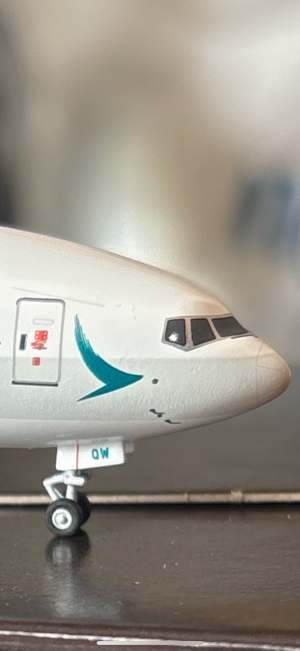
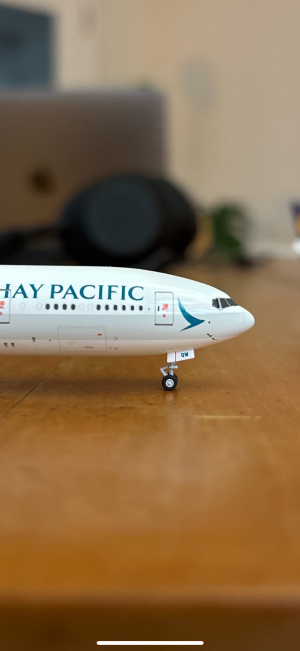
Gosh they’re good that they got you a replacement for that. I’m writing because I’m dealing with exactly your issue above albeit my scratch was a lot larger. I semi-managed to just draw over it with a sharpie (I was otherwise going to get Tamiya paints but I couldn’t be arsed), but now I feel like my fix is inadequate.
 

Attachments

  • IMG_3676.png
    IMG_3676.png
    3.2 MB · Views: 50
  • IMG_3675.png
    IMG_3675.png
    3.4 MB · Views: 44
I would rather have a model in the best condition but that's not always an option. So it really depends on how big the issue is with the model. If the wing came detached and there is still a trace of glue after I fixed it, I can live with it. From memory, I only bought two models I had to get another because of QC issues, a Qatar 777 in the retro livery and an Air France A350 with the Paris 2024 olympics sticker. For the former, the front landing gear was broken and I couldn't fix it. My second example came in perfect condition. For the latter, it is a different story. I really wanted that model in perfect condition so despite managing to fix it, I still bought another one just so I could have one in perfect condition and I turned the first model into a custom model by removing the Paris 2024 sticker. But most of the times, I can live with imperfect models because most defects are not that visible and I have been able to fix the models. I mean they are there but I know it could have been far worse and getting a replacement isn't always the best option. You might get a model in a good condition or you might get really unlucky and receive another defective model. I'm sure quite a few people will disagree with me.
That sounds a lot like me, I’ve got almost a double copy of the Finnair and Cathay A350s as they’re incredibly special for me. For other models less sentimental, I don’t get too hung up on them even in the case where they may be missing an antenna (looking at you AV400).
 
Gosh they’re good that they got you a replacement for that. I’m writing because I’m dealing with exactly your issue above albeit my scratch was a lot larger. I semi-managed to just draw over it with a sharpie (I was otherwise going to get Tamiya paints but I couldn’t be arsed), but now I feel like my fix is inadequate.
Yeah unfortunately to my knowledge NG has that problem with some of their release batches. This NG 777 I’ve got has a similar issue (albeit fainter than your Cathay example). I’m still figuring out if I should use Tamiya or just use a sharpie haha. I’m worried that a sharpie might be too dark for the cockpit window.

(Please forgive the pixelation from my phone’s camera)
 

Attachments

  • FullSizeRender.jpeg
    FullSizeRender.jpeg
    1.1 MB · Views: 55
Gosh they’re good that they got you a replacement for that. I’m writing because I’m dealing with exactly your issue above albeit my scratch was a lot larger. I semi-managed to just draw over it with a sharpie (I was otherwise going to get Tamiya paints but I couldn’t be arsed), but now I feel like my fix is inadequate.
Stick with acrylics for models. They’re water based and won’t damage the underlying paint. I like Vallejo, they offer endless varieties that can be used as is, or mixed to achieve the perfect match. For cockpit chips, I go with black and dark gray, water it down. Then dap a little over the white chip. Looks good as new
 
Yeah unfortunately to my knowledge NG has that problem with some of their release batches. This NG 777 I’ve got has a similar issue (albeit fainter than your Cathay example). I’m still figuring out if I should use Tamiya or just use a sharpie haha. I’m worried that a sharpie might be too dark for the cockpit window.

(Please forgive the pixelation from my phone’s camera)
Sharpie black is a different shade and has a reflection. Tamiya is great if painting a model from scratch but is harsh and can mess up existing paint on a model
 
Stick with acrylics for models. They’re water based and won’t damage the underlying paint. I like Vallejo, they offer endless varieties that can be used as is, or mixed to achieve the perfect match. For cockpit chips, I go with black and dark gray, water it down. Then dap a little over the white chip. Looks good as new
Upon reading this, I just rubbed off the sharpie fix I did and I think I might go ahead with what you just said. What sort of brush did you use, did you use masking tape around the cockpit windows? I'm slightly worried that the paint might still seep underneath the masking tape regardless. Do acrylics also tend to rub off or do you need like primer underneath it before you paint?
 
Yeah unfortunately to my knowledge NG has that problem with some of their release batches. This NG 777 I’ve got has a similar issue (albeit fainter than your Cathay example). I’m still figuring out if I should use Tamiya or just use a sharpie haha. I’m worried that a sharpie might be too dark for the cockpit window.

(Please forgive the pixelation from my phone’s camera)
Honestly I'm kicking myself for not having returned this model, the paint chip is massive but I'm committed to following ghqv's instructions, hope I don't eff it up and make it worse though.
 
If the issue is minor, I just leave it be. But if the subject is Singapore Airlines, I keep buying until I get a good copy.

If the subject is Korean Air, of which zero good models exist and I’m bloody desperate for one, I have a meltdown and wonder why I even bother collecting still.
IMG_5857.gif
 
Upon reading this, I just rubbed off the sharpie fix I did and I think I might go ahead with what you just said. What sort of brush did you use, did you use masking tape around the cockpit windows? I'm slightly worried that the paint might still seep underneath the masking tape regardless. Do acrylics also tend to rub off or do you need like primer underneath it before you paint?
Any modeling brush would do. Usually just go with whatever is the cheapest. Below are links to both the brush and paint. The cockpit color is not quite a flat black, yet it's slightly darker than dark gray, hence mixing both colors would yield the most accurate results. Remember to mix with water to achieve a thinner consistency. Just a little dap of paint and water goes a long way. One thing to note about acrylics is that the finish is mostly flat (compare with enamel which is glossier). However, this works out because cockpit printing tends to have a flat finish anyway. Since acrylics are water based they wipe off very easily when wet. Apply the paint on another part of the model to ensure you've got the desired match and consistency. Can also apply on a piece of white printer paper.

Regarding masking tape, it's up to your comfort level, but also keep in mind that the adhesive can sometimes pull off underlying paint. This was something I encountered with NG's Frontier A318s, where I was trying to patch the silver on the Frontier titles and the tape ended up creating more paint chips because of the adhesive backing. Whereas most of the model printing is coated with a finish to reduce paint chipping, some of the pad printed details are added after the fact it seems and skip that coating process, leaving them more vulnerable. Also be aware that when paint dries, whether enamel or acrylic, it'll peel off surrounding paint when wiped off. Reemphasis on a little goes a long way to reduce messes or additional hiccups.


Brush:

Paint:
 
Any modeling brush would do. Usually just go with whatever is the cheapest. Below are links to both the brush and paint. The cockpit color is not quite a flat black, yet it's slightly darker than dark gray, hence mixing both colors would yield the most accurate results. Remember to mix with water to achieve a thinner consistency. Just a little dap of paint and water goes a long way. One thing to note about acrylics is that the finish is mostly flat (compare with enamel which is glossier). However, this works out because cockpit printing tends to have a flat finish anyway. Since acrylics are water based they wipe off very easily when wet. Apply the paint on another part of the model to ensure you've got the desired match and consistency. Can also apply on a piece of white printer paper.

Regarding masking tape, it's up to your comfort level, but also keep in mind that the adhesive can sometimes pull off underlying paint. This was something I encountered with NG's Frontier A318s, where I was trying to patch the silver on the Frontier titles and the tape ended up creating more paint chips because of the adhesive backing. Whereas most of the model printing is coated with a finish to reduce paint chipping, some of the pad printed details are added after the fact it seems and skip that coating process, leaving them more vulnerable. Also be aware that when paint dries, whether enamel or acrylic, it'll peel off surrounding paint when wiped off. Reemphasis on a little goes a long way to reduce messes or additional hiccups.


Brush:

Paint:
Thank you so much, I’ve basically fixed it according to your instructions. It looks pretty good, just slightly worried about the fact I didn’t use a primer. I’m assuming I basically can’t touch this part of the model now or do you think the paint tends to stay on quite well?
 

Attachments

  • IMG_3681.jpeg
    IMG_3681.jpeg
    1.4 MB · Views: 28
Thank you so much, I’ve basically fixed it according to your instructions. It looks pretty good, just slightly worried about the fact I didn’t use a primer. I’m assuming I basically can’t touch this part of the model now or do you think the paint tends to stay on quite well?
Not too bad overall! I would proudly display that model in my collection.

I've never tried a primer before so am unsure of how it would affect the final finish, but the paint does stay on quite well. I would worry more if the touch up was along the fuselage where there's more contact, with handling or the plastic tray, but on the cockpit? Should be okay!
 
Top